 SuperSpeller
Getting started
How to use predictive text on your Mac
Set up SuperSpeller's offline predictive text, accept suggestions with your keyboard, and adjust writing help in the Mac apps you use.
By SuperSpeller · Updated
Autocomplete and predictive text do different jobs
Autocomplete finishes a word you have started. If you type “arr”, a completion might offer “arrange”. Predictive text uses the words already in your sentence to suggest what comes next. After “Could we arrange”, it might suggest “a time to meet?”
SuperSpeller provides both, alongside spelling suggestions, in supported Mac text fields. These examples illustrate the difference; suggestions vary with your writing. You can accept useful words or keep typing your own.
Set up your first suggestion
- Check that you have an Apple Silicon Mac running macOS 14 or later.
- Download SuperSpeller, install it, and open the app. The AI model is included.
- Follow the welcome tour to grant Accessibility access in System Settings. This lets SuperSpeller read the focused text field and insert suggestions you accept.
- Try the welcome tour’s practice field, then type a few words in an app you normally use.
The welcome tour uses a fixed example to teach the shortcuts. Suggestions in your own apps are generated locally. The first model load can take several seconds. See the compatibility guide if no suggestion appears.
Accept a word, keep typing, or dismiss
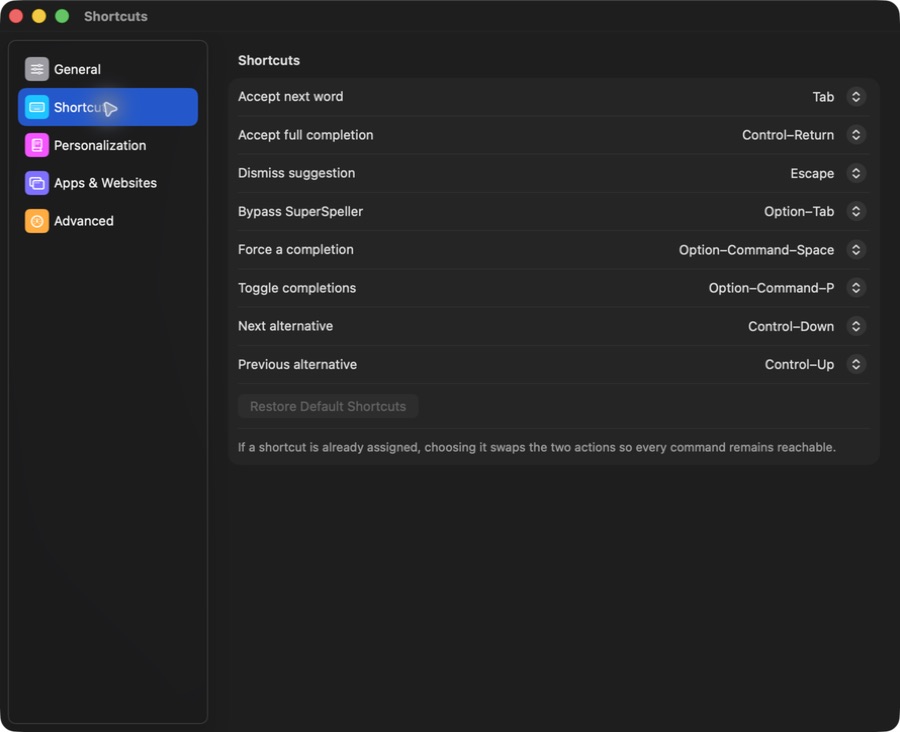
By default, Tab accepts the next suggested word and Control–Return accepts the full completion. Escape dismisses a suggestion. Option–Tab bypasses SuperSpeller when you want to move through fields with Tab.
Open Settings → Shortcuts to change these keys. If a shortcut is already assigned, choosing it swaps the two actions. You can also request a suggestion with Force a completion, which defaults to Option–Command–Space. This still respects disabled apps and other restrictions.
Choose where the help appears
App and website rules let you disable suggestions where they get in the way. Some fields, including small spreadsheet cells and code editors, use on-demand suggestions so automatic completions do not interrupt navigation.
Try a short everyday task during the 7-day trial: a paragraph, a message draft, or a note. Check both suggestion placement and accepted text in that particular app. Read every suggestion before keeping it, especially when a small change could alter your meaning.
Explore all writing features or see trial and license details. A license costs US$15.99 once.